 in a customization of SillyTavern...](/assets/images/screenshots/tavern/lindy.png)
While I use extensions in VS Code for vibe coding, I also interact with large language models through a local frontend called SillyTavern. It doesn't run the models themselves, but lets you chat as long as you've got access to the model.
The application itself is free, but model access may cost $$$. You can the documentation itself. It's something I'm still learning about! I’m not here to sell it. I’ve spent more time tweaking this thing than I care to admit, and it has a lot of quirks.
Customizing any user experience is paramount for me. I wrote elsewhere about the Sunrise Tearoom, my nice crispy theme for SillyTavern. I also created a couple other themes to go with this, and to suit specific characters I'd created as chatbots.
You can, of course, do much more than theming with SillyTavern. It's open source and very easy to extend. I haven't made any extensions for it myself, being too weak. But I have tried out plenty, and I'll share those here, or at least the ones I thought were actually worth anyone's time.
As I find more extensions, I'll update this. I admittedly do a lot of this just "for the aesthetics" though. Expect that! Got questions or suggestions? Hit me up!
My Favorites
- Probably Too Many Tabs will completely rewrite your user experience, while (typically) retaining theming nicely. It moves things around, creating (yes) many, many tabs at once, allowing you to see and click almost anything from the screen immediately or pop it out. This makes things only slightly busy, and amazingly workable. I think it's the best extension I've tried recently for this program.
- Typing Indicator is another extension doing exactly as promised. In this case, it gives an indication of the chatbot "typing" when the large language model behind the prompt generates. This helps give an illusion of online communication. I find it helpful for increasing suspension of disbelief within my Markova-style stories, at least, because they're internet-based.
- Blip gives audio feedback instead of (just) visual feedback when the chatbot generates a response. I use this one sparingly, instead adding a messenger ding sound file to it. This, again, gives the sensation of chatting with someone online and makes it a bit more charming. There are other uses for this one, I think, that I haven't quite got at. So far, I just uploaded that sound file, and it plays in the background when a message is generated.
- LennySuite is an amazing selection of tools, easily installed. While some seem to conflict with, or render other extensions obsolete (vice versa occasionally), it still continues as a net positive for me. And hey, it allows for video backgrounds. I use this for the intense pink and orange clouds in the Sunrise Tearoom and in Weasel83's TFW Midnite version with the lightning.
- Idle Wouldn't it be creepy cool if the chatbots messaged you sporadically to continue roleplays once you've wandered off? A fascinating extension to enable if you're just wandering around online, it basically has the chatbot itself ping you inside SillyTavern with a new message. This happens at the interval you choose, and can be a prompted one, a regeneration, etc...
- Regex helps within SillyTavern, applied both to user messages and to character replies, for many different things. I use it (for example) to remove extraneous formatting that doesn't suit the predicament of my story/game. There are other uses, too.
- Chess Sigh. Play chess with the chatbot. And the chatbot speaks with you during. About the chess game? What the heck??
- Silence Plays a sort of silent sound file to keep the tab active; can be worthwhile on some browsers, but never necessary on any of the ones I've ran SillyTavern on. I list it here for completeness sake, because I did install it and it does have the silent sound file.
- Objective Prompting these critters takes many forms. If you want to provide these things with an overall objective for a roleplay session, it can go through with this extension neatly. The term "objective" gets used rather loosely, but that's a great aspect. I find this good for scenery specifically, but don't use it much otherwise.
- Prompt Inspector Just what you've expected of something with this name: it lets you view the prompt for any given message, which can be useful and entertaining in equal form.
- Memory Books does... memory for your chatbots across multiple conversations. Considering I frequently don't want this, I've barely tested it, but I've hear it's good, so do give this a try!
- Quick Persona Swap between your own personae just as quickly as you might switch between characters, but do it within the same conversation. If I had more than one persona, I'd do this more regularly, but mostly I use it for testing purposes. Swimmingly.
- Character Creator Lets these chatbots help with making characters on their own, in a recursive twist of sorts. It's not something I use regularly, but trying it out was entertaining.
- All But This Swipe Delete all "swipes" in a message except the one you've settled with. Useful for keeping track of things. I keep myself to a strict one swipe per twenty-five messages limit when testing, but this was still worth trying.
STscripts?
STscript is a language (command chain) built into SillyTavern itself. I'm still learning about it as I go, but I've kept back enough to share a few. You install these within the Quick Reply extension, where each script becomes a little button you can press mid-chat. They chain commands together with the pipe character (|), passing the result of one along to the next as ``. So far I've used them to (for example) rename chats automatically. Nifty!
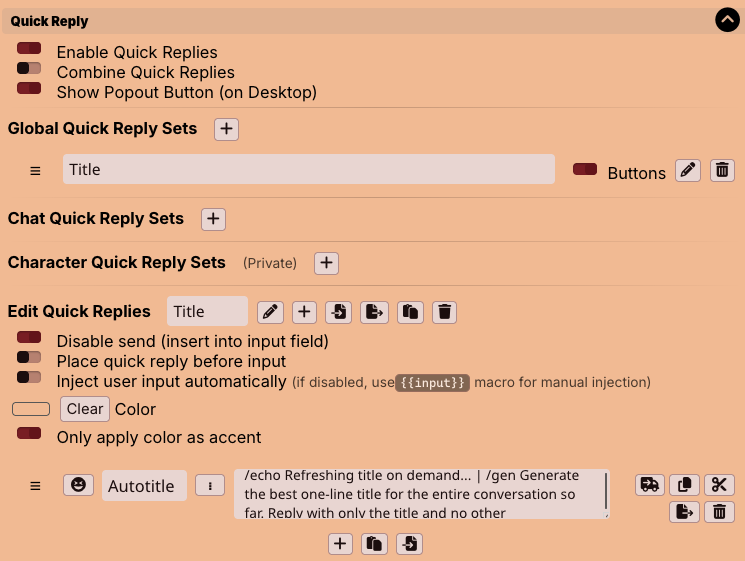
Below is my favorite right now, a script that asks the chatbot to provide an automatic title for the chat. It's useful for me, because it's rather simple, easy to insert as a QR. The point is keeping chats organized which is important since I do a lot of experiments with these models and the cards overlayed on them.
/echo Refreshing title on demand...
| /gen Generate the best title (must be less than 60 characters) for the entire conversation so far. Reply with only the title and no other acknowledgments.
| /trimstart
| /trimend
| /input default={{pipe}}
| /renamechat
Here, ask the chatbot any out-of-character question in a popup window. Then, it will slip back into character. Useful if you need a brief (but not logged or present) "ignore all..." moment from the creature.
/input large=on placeholder="OOC question for the model"
| /genraw instruct=on [Answer out of character, briefly: {{pipe}}]
| /echo severity=info {{pipe}}
Recapping a long chat into a hidden note only you can see (the chatbot won't read it, since /comment stays out of the prompt):
/messages names=on 0-{{lastMessageId}} |
/setvar key=log {{pipe}} |
/genraw Summarize this conversation in 4-6 well-structured but concise bullet points\: {{getvar::log}} |
/setvar key=sum {{pipe}} |
/comment {{getvar::sum}}
Nudging the chatbot's next reply in a direction without breaking character, then tidying up after itself so the note doesn't linger. Similar to the whole "Guide" thing, and I don't use either much at all, in fact having use both only a handful of times, preferring spontaneous dialogues to the max. Maybe you'll find it useful.
/input large=on wide=on placeholder="how should the next reply go?"
| /inject id=steer position=chat depth=0 [Direction for your next reply: {{pipe}}]
| /trigger
| /flushinject steer
That one uses /inject, which slips a temporary note into the prompt. The /flushinject line cleans it up afterward, but if a script ever leaves an injection behind (say you stopped it halfway), you can clear strays with /flushinject steer. Above should be doing it automatically if you use the whole script. If you don't do that, I guess that could be a problem?
I'm admittedly still learning all about this and there is a lot more you can do with STscript...
Themes for SillyTavern
.](/assets/images/favors/twilightsky.png)
I find vibe coding themes and other paraphernalia for SillyTavern extremely fun. Maybe the creators assumed people would do this and made allowances for the practice early on. Maybe it's just because it's an easily workable framework.
Either way, I made multiple aesthetic, yet amateurish themes for SillyTavern, including:
- Sunrise Tho, meant to be used with a looping animation using the video backgrounds extension. Download the animation, called peached.mp4, here.
- TFW Midnite, the background in full downloadable by clicking the nice twilight sky PNG to the right...
Read about installing them in the official SillyTavern installation material once you've got it running, of course. I don't know how workable other people will find these, but they've been okay for me. They don't work half bad within Too Many Tabs and other exotic settings, either!
I hope to someday understand enough of these languages to write more elaborate extensions/etc for SillyTavern and related assets, but who knows if that will ever happen? Contact me here if you've suggestions, impressions or questions!